


Best Projector Setups for Standard Classrooms
A well-designed classroom projector setup can significantly improve how teachers present lessons and how students engage with visual content. In many schools, projectors remain one of the most practical and cost-effective ways to display learning materials at a large scale.
However, the effectiveness of a school projector setup depends on more than just the projector itself. Placement, projection technology, audio, connectivity, and ease of use all contribute to how well the system performs in everyday teaching environments.
This article outlines what a well-designed classroom projector configuration typically looks like and why certain setups have become the preferred option for many schools.
Understanding the Typical Classroom AV Setup
Standard classrooms generally share similar characteristics:
- Seating for 20–30 students
- A teaching wall with a whiteboard
- Moderate ambient lighting
- Teachers presenting from the desk or in front of the board
A well-designed school classroom projector system design should support these conditions while remaining simple and reliable for daily use.
For many schools today, the most practical solution is an ultra-short-throw projector system mounted above the teaching surface.
Why Ultra-Short-Throw Projectors Are Often the Best Projector Setup for Classrooms
Among the different projector configurations available, ultra-short-throw projectors are widely considered one of the most practical options for standard classrooms.
These projectors are mounted directly above the whiteboard and project a large image from a very short distance, typically less than one metre from the screen.
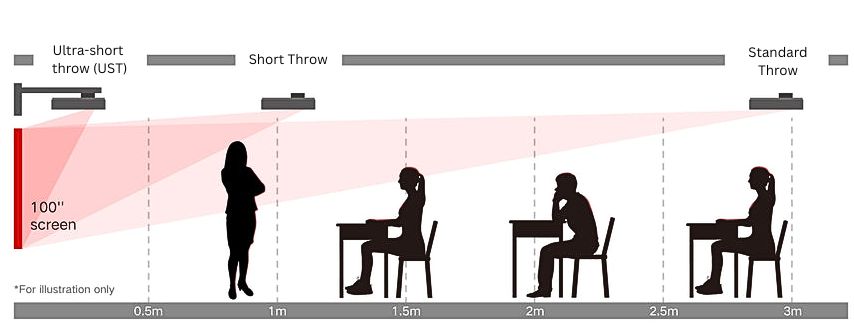
Reduced Shadowing
One of the most common problems with traditional projector installations is shadowing when teachers stand near the screen.
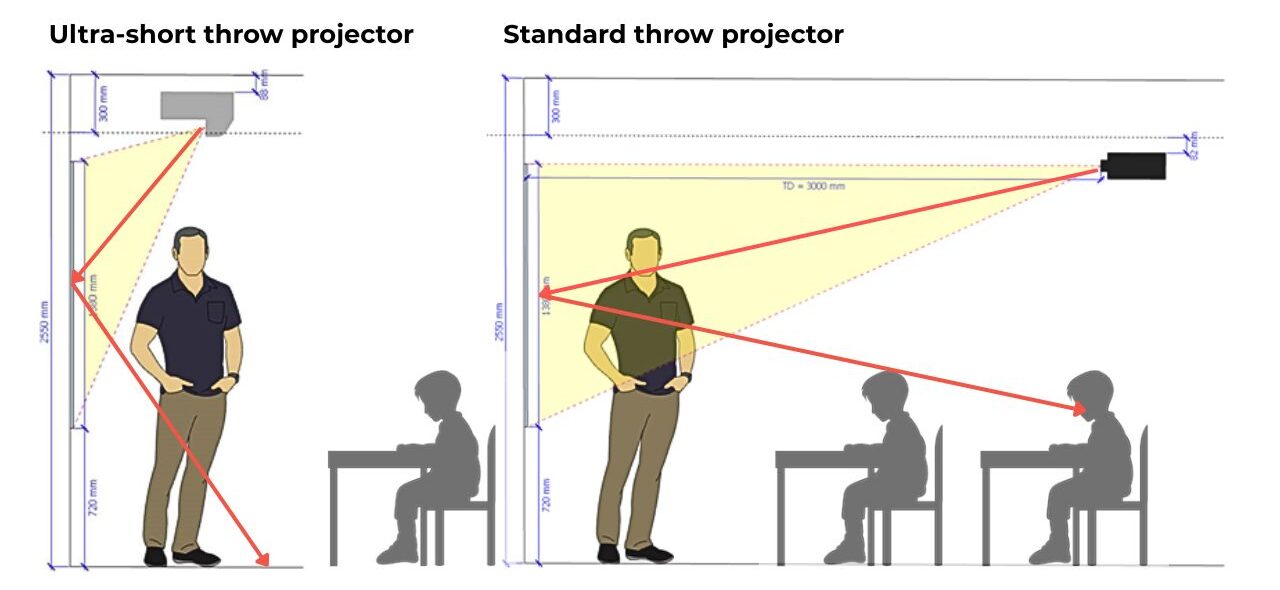
Because ultra-short-throw projectors sit close to the projection surface, the light beam passes downward rather than across the room. This significantly reduces the chance of shadows appearing on the screen during lessons.
Lower Glare for Teachers
With traditional ceiling-mounted projectors, teachers may occasionally look directly into the projector beam while presenting.
Ultra-short-throw systems reduce this issue because the projector light is directed downward from above the board.
Surface Considerations and Hot Spots
When projecting onto standard whiteboards or glossy wall surfaces, a hot spot can sometimes appear—a bright glare area where reflected light concentrates on the screen. This can make parts of the image difficult for some students to see, particularly from certain seating angles.
Hot spots are usually caused by the reflective properties of the projection surface, rather than the projector itself. Matte projection screens and high-quality vitreous enamel whiteboards diffuse light more evenly, helping provide a clearer image for students across the classroom.
Works Well with Existing Whiteboards
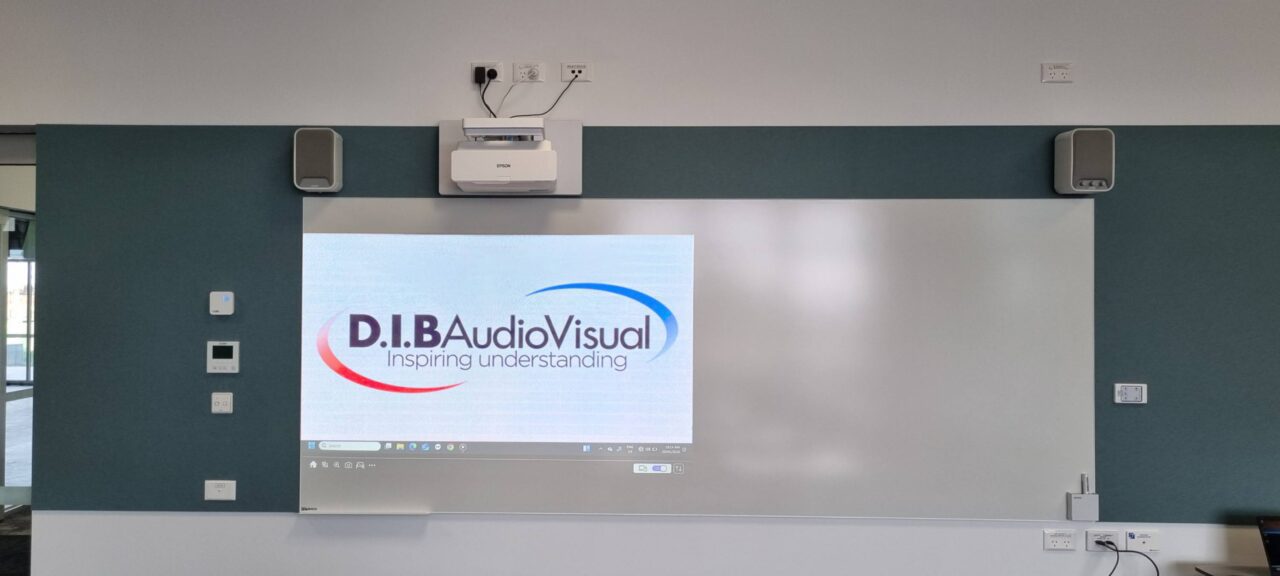
In many classrooms, ultra-short-throw projectors can project directly onto an existing whiteboard surface. This simplifies installation and allows the board to remain usable for traditional marker writing when needed.
Clean and Practical Installation
Because the projector is mounted close to the teaching wall, cable runs are typically shorter and easier to manage.
For many schools, this makes ultra-short-throw systems one of the most practical standard classroom projector configurations available.
Laser Projectors for Low Maintenance
Most modern classroom projectors now use laser light sources rather than traditional lamps.
Laser projection offers several advantages in a school projector setup:
- Long operating life, often 20,000 hours or more
- Minimal maintenance compared with lamp replacements
- Consistent brightness over time

For busy schools managing dozens or even hundreds of classrooms, this can significantly reduce long-term maintenance requirements.
👉 Related: Laser vs Lamp Projectors in Schools: Which Lasts Longer and Costs Less?
Choosing the Right Brightness and Resolution
Brightness remains one of the most important factors in a classroom projector setup.
Most ultra-short-throw classroom projectors are available in the range of 4,000–5,000 ANSI lumens, which is generally suitable for classrooms with ambient lighting.
Resolution is also important for displaying detailed learning materials. At a minimum, most schools now select Full HD (1080p) resolution for clear text and diagrams.
Newer projector models are beginning to introduce higher-resolution projection options, providing even greater image detail for educational content.
Schools can explore brightness requirements in more detail in our guide:
How many lumens does a classroom projector need?
👉 Related: Best Classroom Projector Resolution for Schools: WXGA vs Full HD (1080p) vs 4K
The Importance of a High-Quality Projection Surface
The projection surface is often overlooked but plays a major role in image quality.
Many schools use vitreous enamel whiteboards, which provide a durable, smooth surface suitable for both projection and marker use.
A flat, high-quality board helps minimise distortion and ensures projected images remain clear across the entire display area.
👉 Related: Common Classroom Projector Mistakes Schools Make (And How to Avoid Them)
Audio Matters in a Classroom AV System
While projectors include built-in speakers, these are rarely sufficient for larger classrooms.
A well-designed typical classroom AV setup usually includes dedicated audio, such as:
- A pair of powered classroom speakers, or
- A distributed ceiling speaker system for larger spaces
External audio provides more even sound coverage throughout the room, ensuring that video content, multimedia lessons, and recorded materials remain clearly audible for all students.
Simple Connectivity for Teachers
Ease of use is essential in any best projector setup for classrooms. Teachers should be able to connect their devices quickly without complicated steps.
Common connection options include:
- HDMI inputs for laptops and media devices
- USB-C connections, which can deliver video and device charging through a single cable
- Optional wireless presentation systems for cable-free sharing
In some interactive projector systems, USB-C can also support touch functionality, allowing teachers to interact with projected content directly on the board.
Practical Placement of Classroom Connections
Another often overlooked aspect of school classroom projector system design is the placement of input connections and controls.
In many classrooms, input plates and control panels are installed on the front wall near the projector and teaching area, allowing teachers to connect their devices quickly without running cables across the room.
It is also common to position these connections away from the classroom entry door, ensuring teachers are not forced to operate equipment from a corner of the room where traffic may pass through.
Thoughtful placement of connections helps keep the classroom organised while making the system easier for teachers to use.
Easy System Control
A well-designed standard classroom projector configuration should include simple and reliable system control.
Many classrooms use a wall-mounted control panel that allows teachers to:
- Turn the system on and off
- Select the active input source
- Adjust volume levels
Some systems also include automatic power-off functions or occupancy sensors, helping prevent projectors from being left running after the classroom is empty.
These small design features can reduce unnecessary energy use while simplifying daily operation.
Portable Projector Setups for Flexible Spaces
While fixed installations are common, some classrooms or temporary learning spaces may require a portable projector setup.
In these situations, a standard throw projector placed on a desk or mobile trolley can provide a simple and cost-effective solution. Teachers can position the projector when needed and store it away when the room is used for other activities.
Although portable setups do not offer the same convenience as permanently installed systems, they can still support effective teaching in flexible or budget-conscious environments.
Designing a Reliable Classroom Projector Setup
When schools plan the best projector setup for classrooms, the goal is to create a system that teachers can use confidently every day.
A typical high-quality classroom projector setup may include:
- An ultra-short-throw laser projector
- 4,000–5,000 lumens brightness
- Full HD resolution or higher
- A durable projection whiteboard
- External classroom audio
- USB-C or HDMI connectivity
- A simple wall control panel
When these elements are combined with thoughtful placement and installation, the result is a reliable classroom AV environment that supports effective teaching and clear visual communication.
Planning a Classroom Projector System for Your School
Every classroom environment is different. Room size, lighting conditions, teaching styles, and infrastructure all influence the most suitable classroom projector setup for a particular space.
While ultra-short-throw laser projectors are often an excellent solution for standard classrooms, achieving reliable results still requires careful planning. Projector brightness, image size, mounting position, projection surface, audio coverage, connectivity, and system control all need to work together.
In practice, designing a school classroom projector system is often more complex than it first appears. Many schools therefore choose to work with experienced AV integrators who can recommend suitable equipment and ensure the system is installed correctly.
Companies such as D.I.B Audio Visual specialise in designing and installing classroom AV systems that support reliable, easy-to-use teaching environments.