


Best Classroom Projector Resolution for Schools: WXGA vs Full HD (1080p) vs 4K
Selecting the right classroom projector resolution is one of the most important AV decisions a school can make. Resolution affects text clarity, spreadsheet readability, student engagement, and long-term AV planning.
For Principals, IT Managers and Business Managers, the objective is not simply to choose the highest resolution available — it is to determine the best projector resolution for classrooms based on room size, curriculum demands, device compatibility and lifecycle cost.
This guide compares WXGA, 1080p and 4K projector resolutions in real-world education settings to support informed, future-ready decision-making.
Why School Projector Resolution Matters
In education environments, projectors display far more than video. They support:
- PowerPoint and Google Slides
- Spreadsheets and data tables
- Web-based LMS platforms
- STEM diagrams and CAD drawings
- Hybrid learning and video conferencing
If school projector resolution is insufficient, small text becomes difficult to read — particularly from the back of the room. Teachers compensate by zooming and scrolling, disrupting lesson flow and reducing efficiency.
The right resolution improves:
- Whole-class visibility
- Instructional clarity
- Student comfort
- Teaching continuity
However, resolution works in combination with screen size, viewing distance, brightness, and supporting hardware — not in isolation.
Screen Size and Information Detail: A Critical Link to Resolution
When determining the appropriate classroom projector resolution, schools must consider the level of detail being displayed.
Industry design principles — including guidance from AVIXA— categorise displayed content into three broad types:
Low Detail Content
- Video playback
- Images or photos
- Simple graphics
Students can sit further away while still understanding the material clearly.
Medium Detail Content
- Standard slide presentations
- General text and diagrams
- Web-based learning platforms
This represents the majority of classroom teaching and requires moderate screen sizing and resolution.
High Detail Content
- Excel spreadsheets
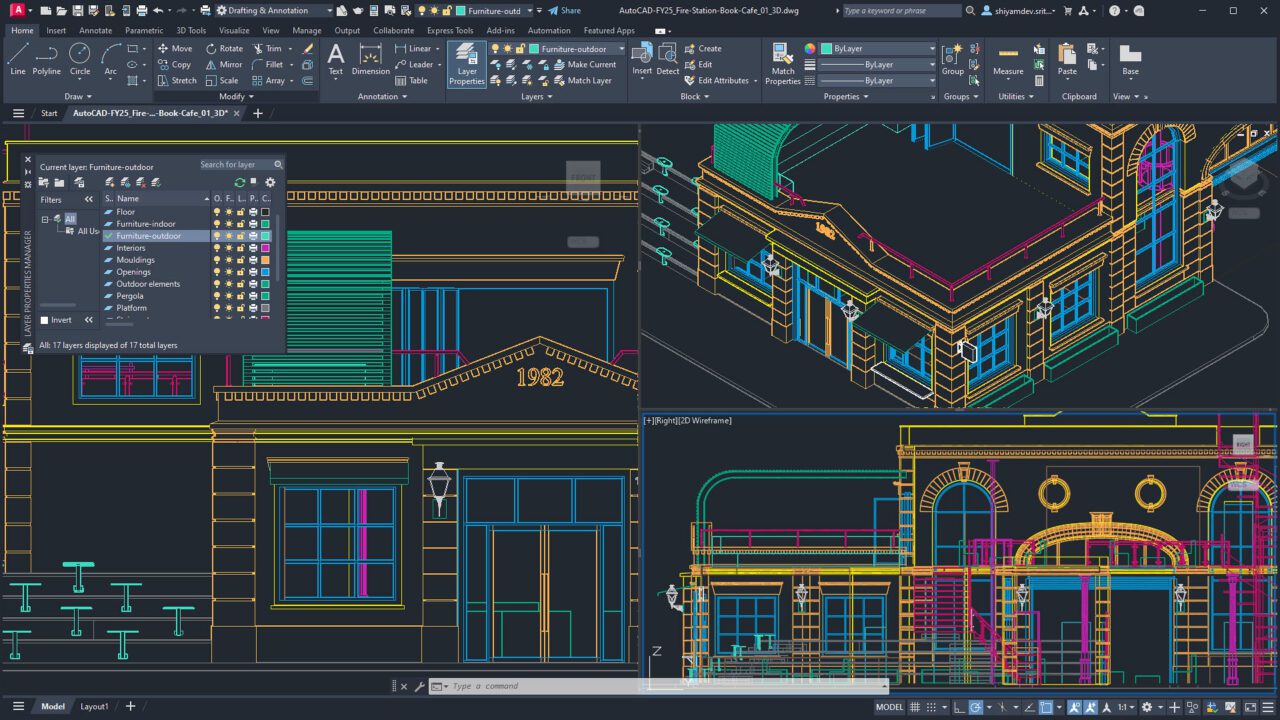
- CAD drawings
- Fine-line diagrams
- Detailed data tables
In these cases, resolution and screen height become more critical. Students must be seated closer relative to screen height to maintain readability.
This is why a STEM room displaying detailed technical diagrams may justify 4K, while a general classroom may not require the same specification.
Viewing Distance and Screen Size Considerations
Resolution performance is closely linked to screen size and viewing distance — an often overlooked factor in classroom projector resolution guides. AV design standards such as AVIXA’s DISCAS guidelines link maximum viewing distance to screen height and content detail level.
While exact ratios vary depending on content detail, the principle is consistent:
In a typical classroom:
- Screen size: 78- 85 inches
- Viewing distance: 3–8 metres
At these distances:
- WXGA may be adequate in smaller rooms or cost-controlled deployments where content is primarily low-to-medium detail.
- 1080p provides stronger clarity for most classrooms
- 4K advantages become noticeable primarily on larger screens or in high-detail specialist environments
Simply increasing diagonal screen size does not guarantee better readability. Screen height and content detail must be considered alongside school projector resolution.
Aspect Ratio and Lost Screen Height
Many schools transitioned from older 4:3 projection formats to widescreen 16:9 systems over the past decade plus.
However, diagonal measurements can be misleading.
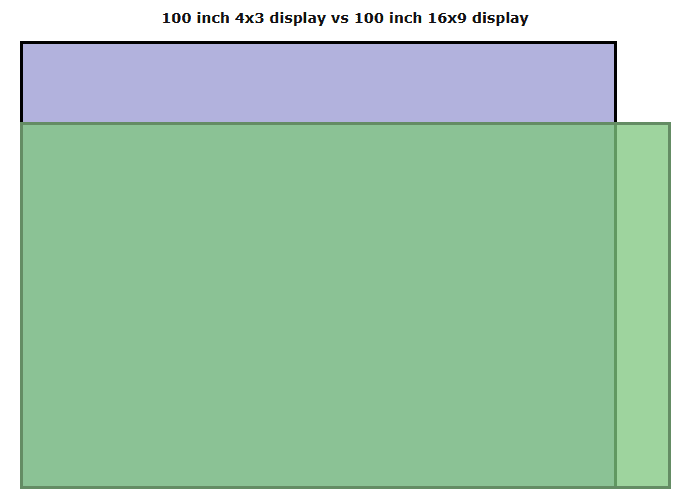
A 100-inch screen in 4:3 format provides approximately 18% more vertical image height than a 100-inch screen in 16:9 format. When schools adopted widescreen without increasing overall screen size, some unintentionally reduced usable image height — which directly affects text readability.
Where WXGA Fits
WXGA (1280 × 800) uses a 16:10 aspect ratio.
It can offer:
- Compatibility with older laptops
- Lower-cost deployment options
However, in mirror mode (common in many schools), the projector often matches the laptop’s resolution. If a laptop outputs 1920 × 1080, a WXGA projector will downscale the image to its native 1280 × 800 resolution. This means the theoretical vertical advantage of 16:10 does not always translate into additional usable detail.
For this reason, WXGA should be viewed primarily as:
- A cost-effective solution
- Suitable for smaller rooms or lower-to-medium detail content
- Not a clarity upgrade over 1080p
Comparing Classroom Projector Resolutions
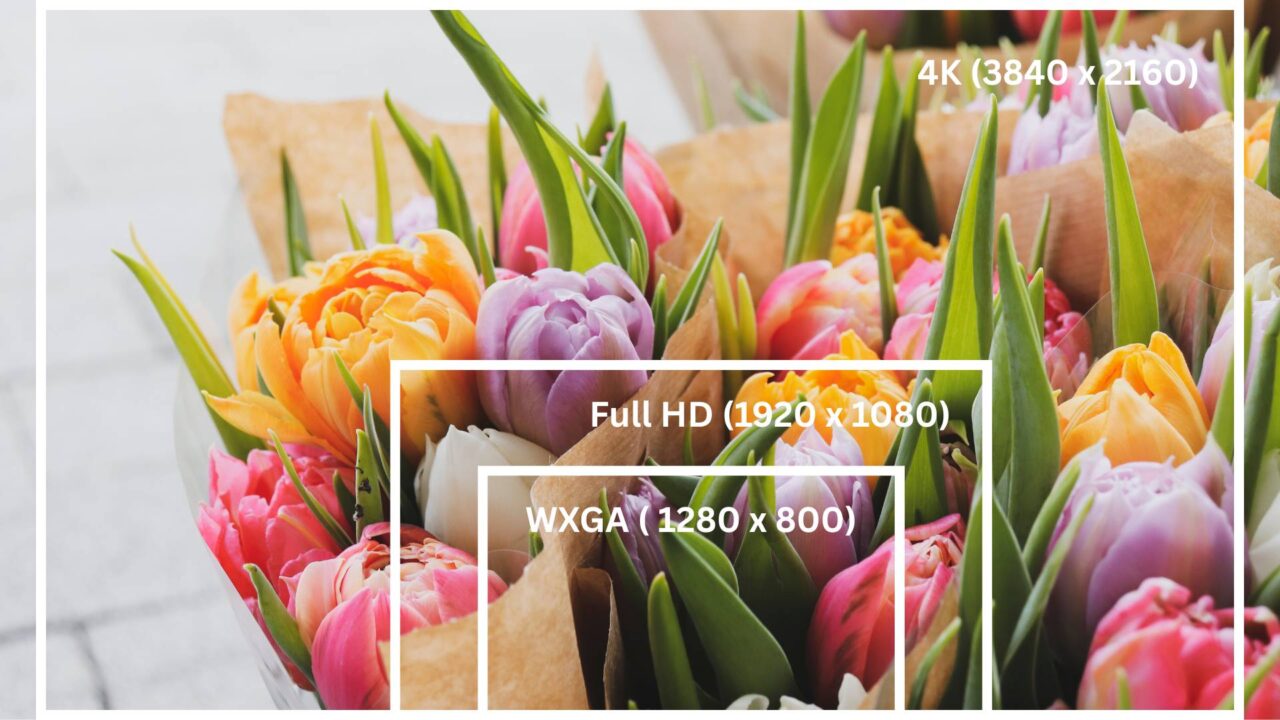
WXGA (1280 × 800 – 16:10)
WXGA remains widely used in primary schools and cost-controlled upgrades.
Strengths:
- Lower cost
- Suitable for small-to-medium classrooms
- Adequate for low-to-medium detail content
- Compatible with many legacy systems
Considerations:
- Lower pixel count than 1080p
- Less suitable for dense spreadsheets or fine diagrams
- Not ideal for larger screens
Best for: Budget-focused deployments.
Mirror Mode, EDID and Why 16:10 Doesn’t Always Deliver Extra Space
When a teacher connects a laptop to a projector in mirror mode (duplicate mode), both displays must operate at a resolution that both devices support.
This process is governed by EDID (Extended Display Identification Data) — a communication protocol where the projector sends the laptop a list of supported resolutions.
A WXGA projector (1280 × 800) might advertise:
- 1920 × 1080 (scaled)
- 1680 × 1050
- 1280 × 800 (native)
- 1280 × 720
- 1024 × 768
If the connected laptop has a native 1920 × 1080 (16:9) screen, the computer will attempt to select a resolution that both displays handle cleanly.
In many real-world classroom scenarios, the system may choose 1280 × 720 (16:9) rather than 1280 × 800, because it better aligns with the laptop’s native aspect ratio.
The result:
- Slight letterboxing (small black bars)
- Some unused vertical pixels
- The practical advantage of 16:10 may not always be realised in mirrored setups
For this reason, while WXGA remains effective and cost-efficient, it is gradually being replaced in new builds by higher-resolution options.
1080p (Full HD – 1920 × 1080)
1080p has become the modern baseline for classroom projection.
Strengths:
- Clear text and HD video playback
- Becoming affordable and widely supported
- Ideal for standard classroom sizes
- Provides more future proofing (system longevity)
Considerations:
- Document-heavy lessons — spreadsheets, long tables, multi-row forms, or dense text — can feel restrictive on 1080p. Small text and detailed rows may require scrolling or zooming, which can disrupt lesson flow. Moving to 4K can provide more usable screen real estate, but only if the classroom uses a sufficiently large screen. This is only a concern for classrooms that frequently display high-density content; for general teaching, 1080p is more than adequate.
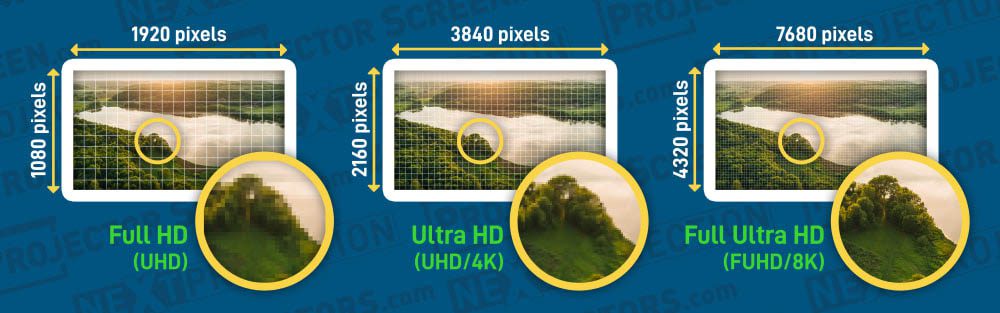
4K (3840 × 2160)
Interest in 4K classroom projectors continues to grow — particularly in specialist learning environments.
Strengths:
- Very high pixel density
- Excellent for large screens
- Ideal for highly detailed visual content
- Strong future-focused specification
Considerations:
- Higher upfront cost
- Requires compatible source devices
- Additional AV infrastructure may be needed, including cabling, wall plates, fly leads, switches, and other hardware — costs can increase in larger or more complex classrooms
- Benefits may be subtle in standard classroom sizes
- Limited availability in ultra short throw models
In many standard K–12 rooms with 78-85 inch screens and 3–8 metre viewing distances, students may not perceive a substantial difference between 1080p and 4K.
Best for: Large lecture theatres, specialist STEM labs, Media, Art, CAD design or medical training environments.
Even With the Right Resolution: What Else Schools Should Evaluate
Resolution is just one part of a broader classroom AV system. A projector performs only as well as the supporting hardware and system configuration behind it. As resolution increases — particularly when moving to Full HD and most critically 4K — correct setup becomes even more important.
- Cabling and connections: HDMI, DisplayPort, wall plates, and fly leads
- Signal distribution and switching: AV matrix switchers, HDMI splitters, networked AV systems
- Mounting and screen setup: Ceiling mounts, motorised screens, or interactive whiteboards
- Power and environment: Adequate power outlets, surge protection, and sometimes cooling for larger installations
- Device compatibility and control: Ensuring laptops, tablets, document cameras, or cameras connect correctly without scaling or resolution issues
Even the highest-resolution projector cannot deliver optimal performance if the supporting hardware is inadequate. Proper planning ensures that all components work together so teachers and students experience maximum clarity, visibility, and usability.
Brightness Matters as Much as Resolution
Resolution determines detail. Brightness determines visibility.
Most classrooms require approximately 3,000–4,000 ANSI lumens, depending on:
- Room size
- Ambient light
- Screen size
- Surface reflectivity
Higher brightness ensures:
- Clear readability at the back of the room
- Reduced eye strain
- Consistent colour performance
- Less need to dim lights
- Reduced reliance on blinds or curtains to control daylight
A properly specified Full HD (1080p) projector with adequate brightness will often outperform a lower-brightness 4K model in real-world classrooms.
👉 Related: Common Classroom Projector Mistakes Schools Make (And How to Avoid Them)
🎯 Content-Source Resolution Alignment
Even the highest resolution projector performs only as well as the content feeding it.
If teacher laptops output at 1080p, projecting onto a native 4K projector does not automatically create additional detail. The image is upscaled — but not enhanced.
Schools should assess:
- What resolution do teacher devices typically output?
- Is most curriculum content Full HD?
- Does the learning environment require native 4K detail?
- Will students perceive the difference at standard viewing distances?
In many K–12 settings, 1080p provides an optimal balance of clarity, compatibility, and cost efficiency.
It is also important to recognise that display technology evolves over time. Higher-resolution projectors, such as 4K, are becoming increasingly cost-accessible and may eventually become the standard in classrooms, much like 1080p replaced older formats in previous years. Advanced formats beyond 4K, such as 8K (7680 × 4320), already exist in specialist and commercial markets, but remain impractical for most classroom environments due to cost, infrastructure demands, and limited educational benefit at typical viewing distances.
Schools should prioritise selecting a resolution that meets current educational needs and practical workflows, while maintaining flexibility to integrate higher-resolution solutions in future upgrade cycles when they are both pedagogically beneficial and financially justified.
Infrastructure and Lifecycle Considerations
When evaluating school projector resolution, IT and Business Managers should consider:
Hardware Compatibility
Higher resolutions, particularly 4K at 60 Hz, may require:
- HDMI standards – Ensure cables and ports support the projector’s resolution and refresh rate. HDMI 1.4 handles 1080p at 60 Hz; 4K at 60 Hz requires HDMI 2.0+.
- High-bandwidth Digital Content Protection (HDCP) compliance – Protects copyrighted content from being blocked or distorted, and applies to both HD and 4K content, whether displayed locally or streamed.
- Switching and distribution – Classrooms with multiple devices require reliable AV switches or matrix systems to prevent lag or signal loss.
- Cabling and connectors – High-quality wall plates, fly leads, and HDMI/DisplayPort cables maintain signal integrity over long distances.
- Network bandwidth – For streaming or networked content, higher resolutions require more bandwidth.
Even HD setups can fail if infrastructure and supporting hardware are outdated or inadequate. Early assessment ensures that the chosen resolution can be fully utilised.
Light Source and Optical Performance
While resolution determines pixel density, perceived sharpness is influenced by optics quality (DLP vs 3LCD, lens design, zoom) and light-source stability. Laser projectors often maintain consistent brightness and colour performance over time, helping preserve image clarity throughout their lifespan.
Total Cost of Ownership
Resolution should align with:
- Device refresh cycles
- Curriculum planning
- Maintenance workload
- Long-term AV strategy
A well-specified 1080p laser projector can remain relevant for many years in a standard classroom.
👉 Related: Laser vs Lamp Projectors in School: Which Lasts Longer and Costs Less?
Future-Proofing Without Over-Specifying
Future-proofing a classroom projector does not mean automatically choosing the highest resolution available. It means selecting a specification that:
- Remains compatible with teacher devices and curriculum content
- Supports typical classroom screen sizes and viewing distances
- Aligns with infrastructure capabilities (cabling, switches, AV distribution)
- Balances performance and cost for your planned refresh cycle
Some schools upgrade every 5 years, others every 7, or only when a system fails. Picking the right resolution and supporting hardware ensures your projector stays effective throughout its intended lifespan.
👉 Related: How to Choose a Low-Cost Classroom Projector Without Compromising Quality
Planning Your Classroom Projector Strategy?
Selecting the right classroom projector resolution isn’t about chasing the highest numbers — it’s about finding the right balance for your school. Resolution is just one piece of a broader AV system: brightness, light source technology, throw distance, infrastructure compatibility, and long-term maintenance all influence how a projector performs in real Victorian classrooms.
For a broader framework covering specification, budgeting and room-by-room planning, explore our pillar resource:
Classroom Projectors for Schools | Complete Guide for Victorian Classrooms
This complete guide expands on how to evaluate school projector resolution, align systems with curriculum requirements and plan upgrades across multiple learning spaces.
If your school is reviewing projector replacements or planning new installations, engaging an experienced education AV specialist can help ensure the right balance of performance, longevity and value.
D.I.B Audio Visual works closely with Victorian schools to design, supply and install projector systems tailored to real classroom conditions — supporting Principals, IT Managers and Business Managers with practical, future-ready AV solutions.
A well-planned projector strategy is not about choosing the highest specification. It is about selecting the right solution for each learning space — ensuring clarity, reliability and long-term educational impact.