

How Many Lumens Does a Classroom Projector Need?
When specifying a classroom projector, one of the first questions asked by Principals, IT Managers and Business Managers is:
How many lumens does a classroom projector need?
There is no single brightness number that suits every classroom. The correct level of classroom projector lumens depends on how the room is used, how large the image is, and how much light reaches the projection surface.
Selecting the wrong brightness leads to either:
- Under-specification — dim, washed-out images
- Over-specification — unnecessary capital cost
Understanding how brightness works allows schools to specify confidently and avoid both.
The Four Factors That Determine Classroom Projector Lumens
The brightness required in a classroom environment depends on:
- The nature of the room lighting
- The size of the projected image
- The type of content being displayed
Each factor affects perceived image quality in a different way, and they must all be considered together for accurate planning.
What Are ANSI Lumens?
ANSI lumens are the standard measurement of a projector’s brightness, developed by the American National Standards Institute (ANSI) to provide a consistent method for testing and reporting light output.
Unlike marketing claims that can vary between manufacturers, ANSI lumens give a reliable, comparable measure of how much light a projector produces.
Key Points:
- ANSI lumens measure total white light output from a projector.
- A higher ANSI lumen rating generally means a brighter image — if all other factors are equal.
- ANSI lumens do not account for screen size or ambient light, which is why calculating brightness per square metre is essential for classroom planning.
Why It Matters in Schools:
Two projectors with the same ANSI lumens can appear very different in the classroom because differences in screen size, room lighting, and content type affect perceived brightness. Using ANSI lumens allows schools to make objective comparisons and choose a projector that meets their classroom’s actual needs.
1️⃣ Ambient Light — The Primary Factor
Ambient light includes:
- Natural light from windows
- Overhead LED or fluorescent lighting
- Reflected light from walls, floors, and ceilings
The key distinction is this:
It is not how much light is in the room — it is how much light lands on the projection surface.
If sunlight hits the screen directly, image contrast reduces dramatically— and in many cases the image becomes unreadable, regardless of projector brightness. Quite simply, nothing beats direct sunlight. If blinds or the room layout prevents light from striking the screen, brightness requirements decrease.
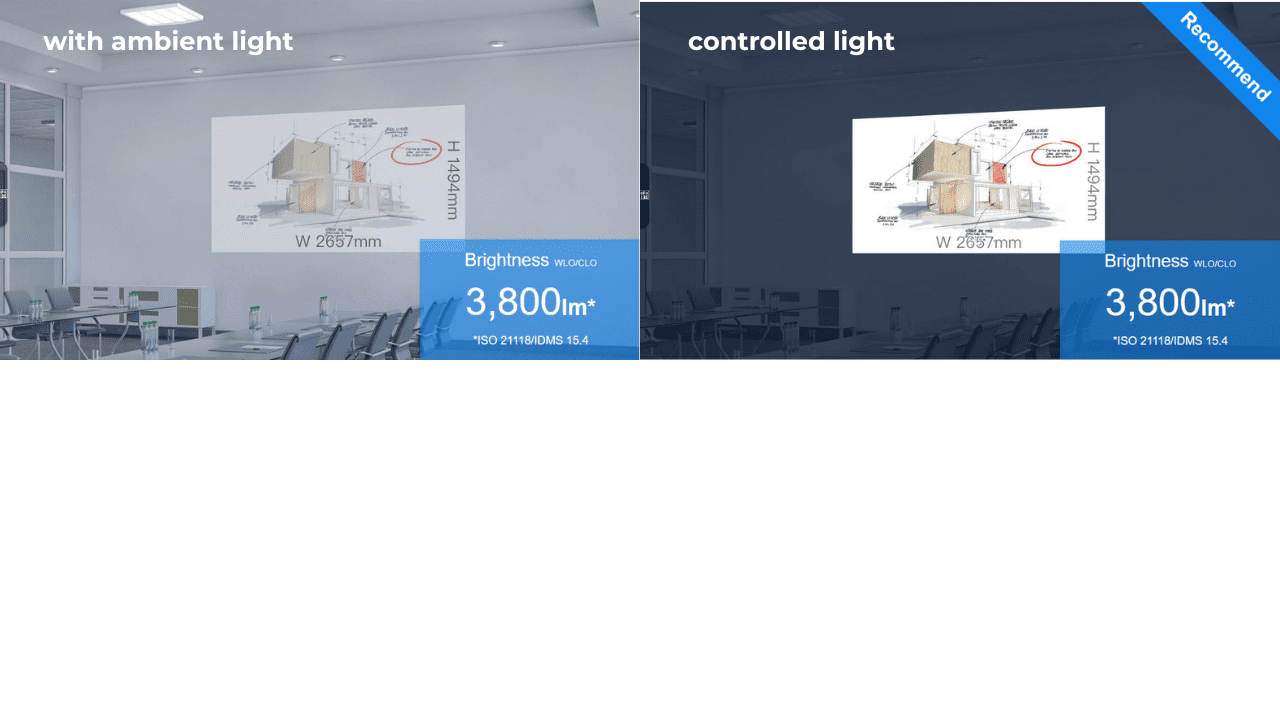
In most classrooms, lights remain on for safety and note-taking. Fully darkened rooms are impractical. Therefore, brightness must compensate for controlled but present ambient light.
👉 Related: Common Classroom Projector Mistakes Schools Make (And How To Avoid Them)
The Fundamental Principle: Projectors Do Not Project Black
This concept underpins the entire brightness discussion.
A projector:
- Adds light to the screen
- Does not remove existing light
White areas appear bright because light is projected onto them.
Black areas are simply areas where the projector adds little or no light.
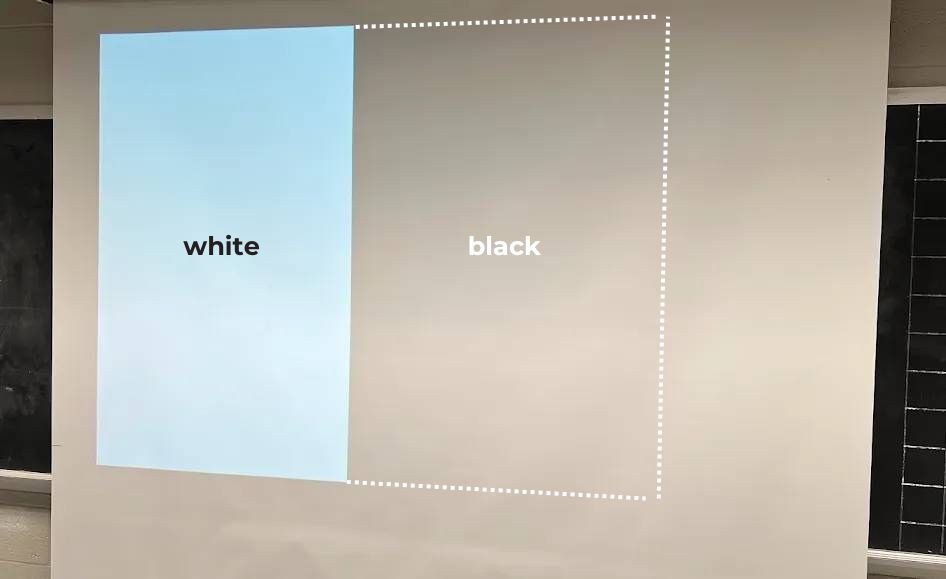
If ambient light hits the screen, black areas cannot remain truly dark — they become grey. The only way to achieve near-black projection is to eliminate all ambient light, which is rarely feasible in schools.
This is why brightness selection must always consider lighting conditions.
2️⃣ Screen Size and Brightness Density (Lumens per Square Metre)
Projector brightness is distributed across the entire image area.
If you double the diagonal screen size, you approximately quadruple the surface area. That means:
- The same lumen output is spread thinner
- Brightness per square metre decreases
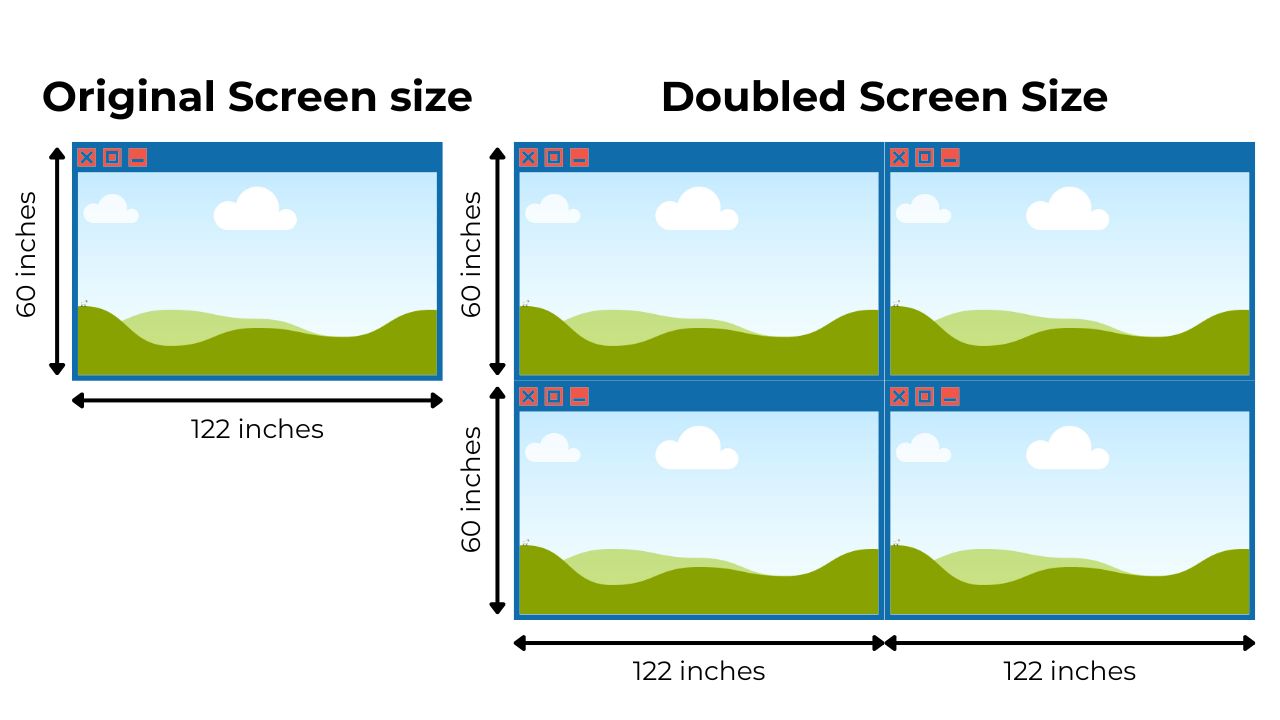
This is why raw lumen numbers alone can be misleading.
A 5,000 ANSI lumen projector on a 120″ screen may appear dimmer than a 3,800 ANSI lumen projector on an 85″ screen — purely because of area differences.
Why ANSI Lumens per Square Metre Matters
Instead of focusing only on total ANSI lumens, a more accurate metric is:
ANSI lumens per square metre
How to Calculate It
- Measure screen width × height (in metres)
- Calculate area (m²)
- Divide projector ANSI lumens by area
Example:
- Projector: 4,000 ANSI lumens
- Screen area: 2 m²
4,000 ÷ 2 = 2,000 ANSI lumens per m²
This allows fair comparison between different installations.
A 10,000 lumen projector on a very large screen may deliver lower brightness density than a 5,000 lumen projector on a moderate-sized surface.
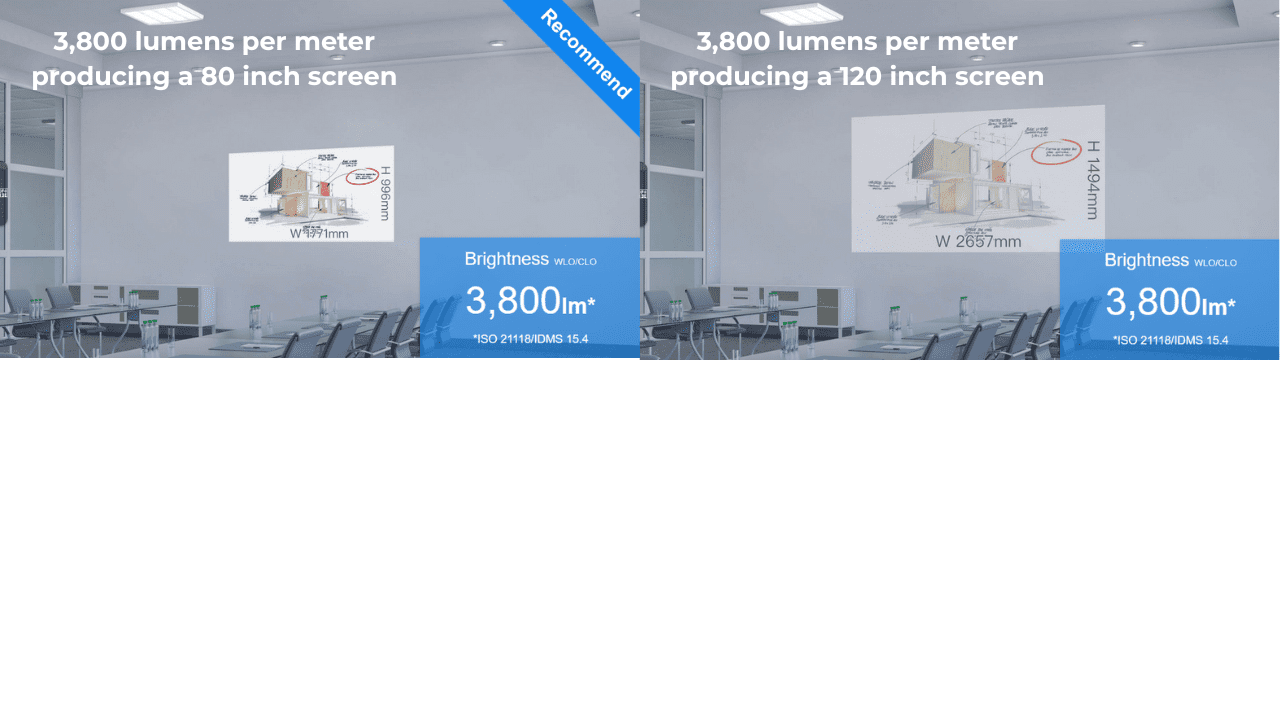
Brightness potential is determined by density — not just total output. What ultimately determines how bright a classroom image appears is not just the projector’s total ANSI lumen rating, but how concentrated that light is across the screen surface. In practical terms, brightness is determined by lumens per square metre — not total output alone.
Screen Size Expansion: 85″ vs 130″
Modern ultra-short throw projectors can produce image sizes up to 130″.
However:
- Larger screen = lower brightness per m²
- Higher lumen output is required to compensate
Schools sometimes increase screen size without adjusting brightness accordingly. This leads to reduced clarity, especially in bright classrooms.
Practical Brightness Benchmark for Standard Classrooms
For many standard classrooms:
- Screen size: approximately 85″
- Projector output: 3,800–5,000 ANSI lumens
- Effective brightness: around 2,000–2,500 ANSI lumens per m²
This range performs effectively in most classrooms with reasonable light control and general teaching content.
When moving beyond 100″–130″ screen sizes, brightness density drops unless lumen output increases proportionally. Effective brightness must be checked to maintain clarity.
3️⃣ Content Type and Perceived Contrast Requirements
Different types of content have different brightness demands.
Standard Classroom Content
- Black text on white backgrounds
- Colourful slides
- Web content
These are high contrast and generally tolerate moderate brightness levels well.
Specialist Visual Content — Examples That May Require Higher Brightness
Some types of content are more sensitive to ambient light and require stronger perceived contrast. These can include, for example:
- Art and photography
- Black-and-white imagery
- Video with shadow detail
- Detailed diagrams with dark regions
This is not an exhaustive list — other detailed or contrast-heavy content may also benefit from higher brightness.
In rooms with ambient light, higher brightness levels help maintain clarity, preserve shadow detail, and ensure that content remains clear from all viewing positions.
Why More Lumens Improve Perceived Contrast
In brighter rooms, increasing ANSI lumens does not make black “blacker.” Instead, it increases white luminance.
This stronger white level:
- Expands perceived contrast
- Makes dark areas appear relatively darker
- Improves legibility
In technical terms, brightness increases the luminance ratio between projected whites and ambient-reflected blacks.
The more ambient light present — and the more contrast-sensitive the content — the higher the lumen requirement.
4️⃣ Throw Distance — How Far the Projector Is From the Screen
Throw distance is the physical distance between the projector lens and the screen. It affects image size, light density, and clarity.
How Throw Ratio Works
Every projector has a throw ratio, which tells you how far back it must be placed to produce a given image width:
Throw Distance=Throw Ratio×Image Width
- A 1.2:1 throw ratio projector requires 3.2 m to project a 120″ screen.
- Ultra-short throw projectors (e.g., 0.5:1) can produce the same image size from a much shorter distance.
Why Throw Distance Affects Perceived Brightness
- ANSI lumen output does not change with throw distance.
- Larger images from longer throw distances spread light over a greater area, lowering brightness per square metre.
- Shorter throws concentrate light on smaller areas, increasing apparent brightness.
Example:
- 4,000 ANSI lumens, 85″ screen, short throw → ~2,000 ANSI lumens per m²
- Same projector, 130″ screen, longer throw → ~1,200–1,400 ANSI lumens per m²
Planning Tips
- Decide on your desired screen size.
- Use the projector’s throw ratio to determine the required distance.
- Confirm brightness per square metre meets classroom needs with ambient light and content type.
Most modern ultra-short throw projectors can produce large images from very short distances, reducing shadows, glare, and installation complexity — ideal for classrooms with limited space.
👉 Related: Classroom Projector Options Explained: Types of Projectors for Schools
When You Need More Lumens
Higher brightness is typically required when:
- Ambient light levels are high — more light hitting the screen reduces contrast
- Light control is limited— blinds, curtains, or lighting adjustments are insufficient
- Screen size exceeds 100″— larger images spread light over a greater area, reducing brightness per square metre
- Content includes dark or detailed imagery — black-and-white images, shadowed diagrams, or high-detail visuals
- Longer throw distances — producing a larger image from further back reduces apparent brightness, so higher-lumen projectors may be needed
In these scenarios, higher lumen output maintains image clarity across the room.
Lamp Degradation — A Common Oversight
Lamp-based projectors lose brightness over time.
It is not uncommon for lamp units to approach 50% brightness near end-of-life.
Example:
- Original rating: 3,500 ANSI lumens
- After significant lamp usage: ~1,700 ANSI lumens
If paired with a 1.7 m² screen: Effective brightness may drop to around 1,000 ANSI lumens per m².
This reduction often leads schools to conclude that “projectors are too dim,” when the issue is ageing light source performance.
Modern laser or LED-based projectors maintain brightness more consistently over time.

👉 Related: Laser vs Lamp Projectors in Schools: Which Lasts Longer and Costs Less?
Practical Brightness Framework for Schools
When evaluating lumens needed for classrooms, consider:
Standard Classroom (≈85″, controlled lighting)
3,500–5,000 ANSI lumens
Bright Classroom or Limited Light Control
5,000+ ANSI lumens
Large Screens (100″–130″)
Higher lumen output required to maintain brightness density
Specialist Visual Applications
Prioritise higher brightness and light management
There is no single “correct” lumen number — only the correct match between room, screen, and content.
Final Thoughts
Selecting the correct classroom projector brightness is a systems decision.
It must align:
- Lighting conditions
- Screen size
- Teaching applications
- Equipment lifecycle
When brightness is properly specified, projection remains a scalable, effective display solution for schools and office training environments.
For further planning guidance:
- Common classroom AV mistakes schools make with projectors
- Classroom projector placement & image size guide
- Best projector setups for standard classrooms
Looking at the Bigger Picture
Determining the right lumens for a classroom projector is crucial — but it’s only one part of a successful AV strategy. When reviewing multiple rooms or planning a broader technology refresh, it’s important to consider the entire learning environment, not just projector brightness.