


How to Choose a Low-Cost Classroom Projector Without Compromising Quality
When schools search for a low cost classroom projector, the natural instinct is to look for the lowest price. But in education environments, the cheapest option is rarely the most affordable in the long run.
Projectors are everyday teaching tools. If brightness is inadequate, controls are complicated, or reliability is poor, learning is disrupted — and replacement often happens years earlier than planned.
A smarter approach is to think beyond purchase price and focus on total cost of ownership.
A true budget solution is the one that:
- gets the fundamentals right
- avoids unnecessary features
- lasts through a full upgrade cycle
- and is simple enough that teachers use it confidently every day
Here’s how schools can reduce costs without compromising quality.
Start With the Core Purpose: Clarity First, Everything Else Second
Before comparing brands or specifications, step back and ask a simple question:
What must this projector do well in every lesson?
In classrooms, the answer is straightforward: students must be able to clearly read and interpret information on the screen from anywhere in the room.
Interactivity, 4K resolution and advanced feature sets can absolutely be appropriate in certain rooms — particularly specialist spaces or large presentation areas.
However, in many standard classrooms, they are not essential to delivering clear, effective teaching.
When decisions drift toward “nice to have” technology rather than teaching outcomes, budgets get consumed quickly with little practical benefit. The most cost-effective classrooms usually have the simplest systems — but they perform the core task exceptionally well.
Prioritise Brightness First
Brightness has the greatest impact on image quality and day-to-day usability.
It directly affects:
- text readability
- contrast
- whether blinds must be closed
- overall teacher and student comfort
An underpowered projector creates constant friction. Teachers dim lights, students struggle to read content, and the system feels outdated long before its time.
As a practical rule of thumb:
- 80–100 inch classroom screens typically require 4,000–5,000 lumens minimum
Rooms with natural shading and/ or blinds may allow slightly lower brightness. Brighter spaces may require more.
Choosing the correct lumen level is often the single most important decision when selecting a low cost classroom projector for schools — and one of the most expensive mistakes to get wrong.
👉 Related: Common Classroom Projector Mistakes Schools Make (And How to Avoid Them)
Select the Right Throw Type for the Room
Brightness and resolution matter — but so does where the projector sits.
Choosing the wrong throw type can create shadows, glare, installation challenges, or unnecessary cost.
Most classrooms will fall into one of three categories:
Standard Throw (ceiling mount)
Typically the most affordable option if you can reuse existing ceiling mounts. Without existing mounts, installation may be more complex and expensive than ultra-short-throw alternatives. Teachers may also cast shadows or experience beam glare.
Ultra Short Throw (UST)
Mounted close to the wall, minimising shadows and glare while creating a clean front-of-room setup. Usually comes at a higher equipment and installation cost.
The right choice depends on:
- room depth and ceiling height
- teacher position
- screen size
- existing infrastructure
- available budget
Standard throw may reduce upfront spend — especially when reusing mounts — but short or ultra-short-throw can improve daily usability in the right environment.
As with brightness and resolution, throw type should be selected based on room needs, not assumptions.
Reduce Cost by Reusing What You Already Have
Reducing cost isn’t always about buying cheaper hardware. Often, it’s about replacing less.
If your classrooms already have:
- ceiling mounts
- cabling
- control systems
- speakers
These elements can often remain in place for multiple upgrade cycles.
Reusing infrastructure lowers installation time, labour costs and disruption. Low cost sometimes means smarter deployment, not cheaper equipment.
Similarly, standard throw projectors are typically more affordable than ultra-short-throw models and may allow schools to reuse existing ceiling mounts. However, this is primarily a cost decision. Ultra-short-throw designs often improve teacher comfort, reduce shadows and glare, and create a more modern teaching position.
When budgets are tight, standard throw can be a practical way to reduce upfront spend — but schools should weigh the operational trade-offs, not just the purchase price.
Choose Resolution Based on Real Classroom Needs
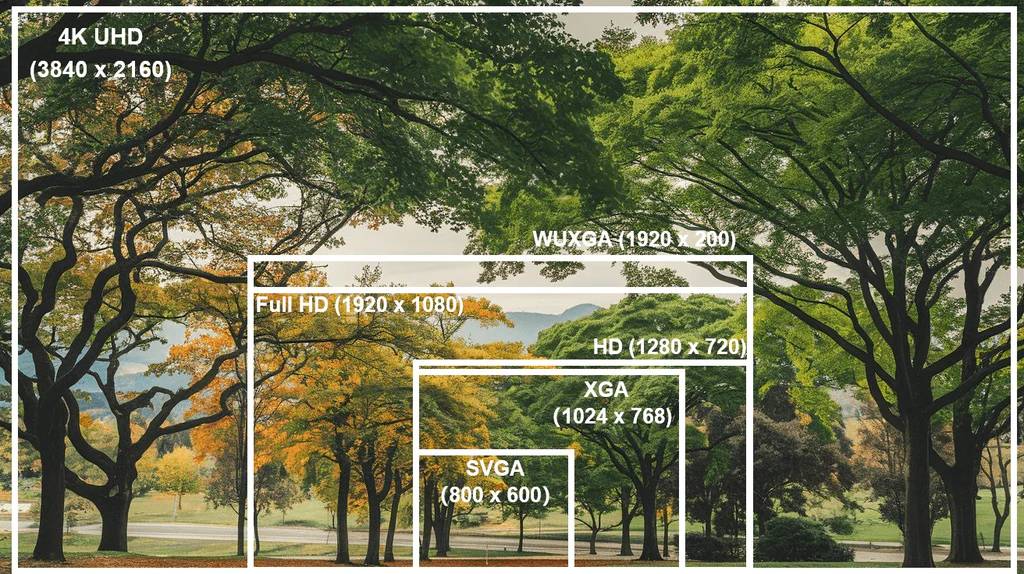
Resolution should support clarity — not inflate cost.
For most classrooms:
- 1080p (Full HD) is more than adequate
- WUXGA suits detailed content
- 4K often adds significant cost with limited visible benefit for smaller classrooms
However, the need for higher resolution depends on the teaching material and screen size. In specialist rooms — such as Art, Graphics, CAD, or Engineering — or when using larger screens, 4K may be important to ensure fine detail is clear from anywhere in the room.
At typical classroom screen sizes and lesson types, prioritising brightness, reliability, and lifespan delivers far more value than investing heavily in ultra-high resolution.
Consider Light Source and Lifecycle, Not Just Purchase Price
A lower upfront price doesn’t always mean lower cost over time.
Lamp-based projectors may be suitable for short-term needs, but they require:
- ongoing lamp replacements
- maintenance
- downtime
Laser light sources are typically rated for around 20,000 hours of operation. Given many classrooms operate only 400–800 hours per year, a laser projector can comfortably last an entire 6–10 year upgrade cycle with minimal servicing.
Fewer consumables and fewer interruptions often make laser models more economical over the life of the system.

👉 Related: Laser vs Lamp Projectors in Schools: Which Lasts Longer and Costs Less?,
Avoid Paying for Features Teachers Won’t Use
In both classrooms and large AV spaces, one of the most common budget leaks is unnecessary functionality.
When planning systems, it’s easy to say “yes” to every capability — interactive features, advanced integrations, specialised inputs — simply because they sound useful.
But if teachers don’t use them regularly, that investment delivers little return.
In many cases, those funds are better allocated to:
- higher brightness
- better reliability
- longer lifespan
A simpler, well-specified projector often provides more real-world value than a feature-heavy one.
Define Use Cases and Understand Feature Costs Before You Buy
One of the biggest causes of overspending isn’t poor equipment — it’s unclear planning.
Many projects follow a “shopping list” approach:
- Do you want this feature? Yes.
- How about this one? Maybe.
Individually, each decision feels small. Collectively, they can significantly increase cost without improving everyday teaching.
A better approach is to start with operational reality. Consult the people who use the room daily — teachers, leading educators, or heads of department — and frame the discussion around how AV can support changes in teaching practice, not simply which new technology looks exciting.
Ask:
- How is the projector used during a typical lesson?
- Where does the teacher stand?
- How often are different inputs changed?
- Will this feature genuinely be used each week, or only occasionally?
This often reveals that many “nice to have” additions aren’t necessary.
Equally important is understanding the cost impact of every decision. Every feature adds budget. Without clear feedback, small upgrades quietly accumulate into large overspends.
Experienced AV partners like D.I.B Audio Visual should provide transparent guidance, helping schools weigh trade-offs and prioritise what genuinely improves learning outcomes.
Ease of Use Directly Impacts Value
Technology that is complicated or slow to operate simply doesn’t get used.
Confusing controls or multi-step startup processes lead to:
- support calls
- lost lesson time
- teacher frustration
Systems are often replaced early not because they fail technically, but because the image quality is inadequate or the controls are frustrating. Teachers quickly lose confidence in equipment that disrupts lessons.
Projectors should be simple:
- power on
- select input
- start teaching
Consistency and simplicity drive adoption — and long-term value.
Design Guidance: Planning for the Right Projector from Day One
Choosing a low-cost classroom projector isn’t just about price — it’s about making the right choices upfront to avoid costly mistakes later. Experienced AV specialists, like D.I.B Audio Visual, provide design guidance that goes beyond product selection, helping schools:
- Match the projector to the room – Screen size, throw distance, ambient light, sightlines
- Select the optimal throw type – Standard vs ultra-short-throw, balancing cost, teacher comfort, and classroom layout
- Plan for future upgrades – Ensure cabling, ceiling mounts, and control systems can last multiple projector cycles
- Prioritise core teaching needs – Brightness, clarity, and reliability first; advanced features only where they genuinely improve learning outcomes
- Avoid unnecessary costs – Identify features unlikely to be used, redirecting budget to items with real classroom value
Good design guidance reduces the risk of early replacement, installation mistakes, and wasted budget — ensuring the projector delivers long-term performance and adoption.
Plan Upgrades Strategically
Upgrading classrooms one at a time often increases costs.
Bundling projects across multiple rooms typically reduces:
- procurement premiums
- installation labour
- overall project overhead
It’s also important to remember that not every component needs replacing each cycle. Quality infrastructure such as speakers, wall controllers and cabling can often last through two or three projector refreshes.
This staged approach significantly lowers lifecycle costs.
Work With Experienced AV Specialists
Price shopping alone can be risky. Low-cost online suppliers may offer cheaper hardware, but often lack:
- design guidance
- system fit expertise
- long-term support
Selecting the wrong projector or configuration can create operational headaches that outweigh any upfront savings.
Working with experienced partners such as D.I.B Audio Visual helps schools balance performance, cost, and longevity — often saving far more over the life of the system than small purchase discounts.
What “Low Cost” Really Means
A low cost classroom projector isn’t the cheapest device available.
It’s the one that:
- matches the room
- provides sufficient brightness
- has appropriate resolution
- is easy for teachers to use
- lasts through the full upgrade cycle
- minimises maintenance and downtime
Because replacing a cheap projector early is always more expensive than choosing the right one the first time.
Final Thoughts
For schools and organisations across Australia, the goal isn’t simply to spend less.
It’s to spend wisely.
Focus on fundamentals.
Eliminate unused features.
Design for longevity.
Plan upgrades strategically.
Do that, and you’ll achieve genuine savings while delivering a reliable, effective learning environment.
Looking for the Bigger Picture?
Choosing a low cost classroom projector is only one part of a successful classroom AV strategy.
Room layout, throw distance, mounting methods, audio integration, control systems, and lifecycle planning all play a role.
If you’re reviewing multiple rooms or planning a broader refresh, it helps to look at the entire environment — not just the projector.