

Mic Not Working in Your School Hall or Classroom? What to Check
In short: most school microphone problems come down to a flat battery, a muted mic, a muted system, or the way the mic is being held. These checks take a few minutes and can save you a service call.
If they don’t fix it, log a service request and we’ll sort it out.
Direct Service Phone: 03 9459 0000
Email: service@dibaustralia.com.au
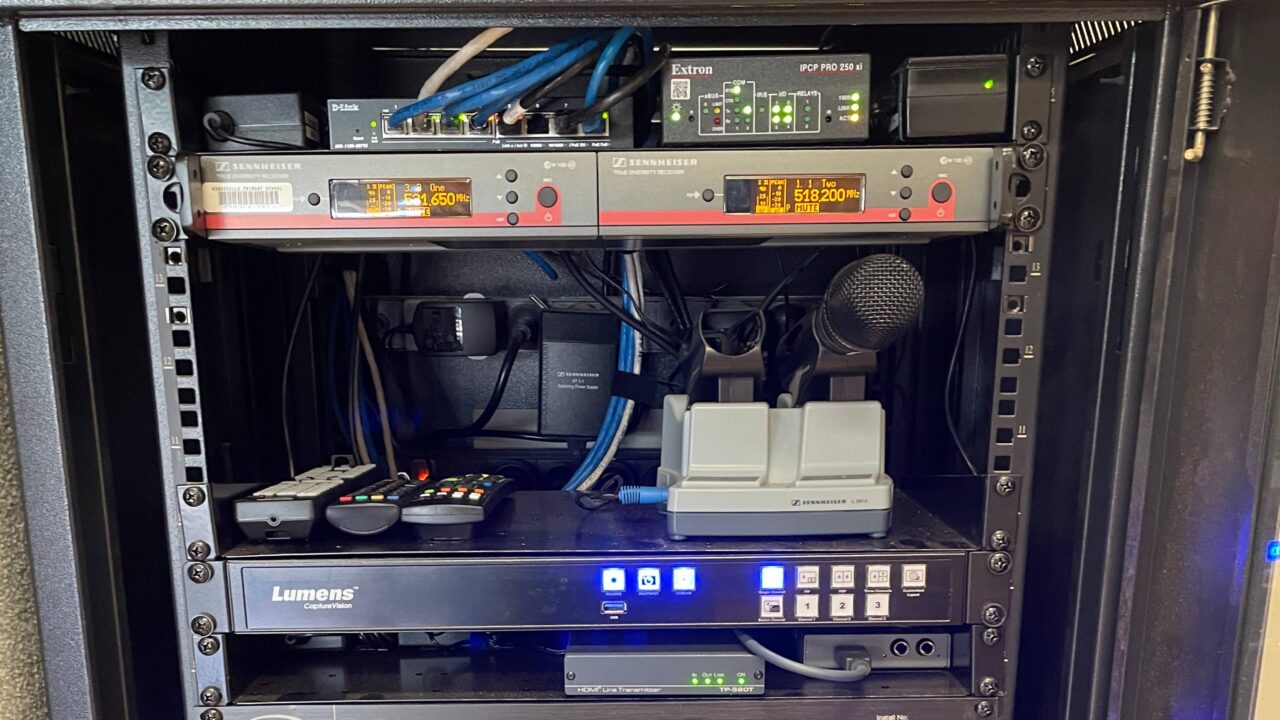
These are simple checks for staff, not a technician’s guide. Look at the equipment rack, but never open, unplug or change anything inside it.
1. Does the microphone have power?
Turn the mic on. Look for a light or a small screen on the mic.
If nothing comes on, the battery is probably flat.
- Replaceable batteries: many school wireless mics take AA batteries. Fit fresh ones the right way round and try again.
- Rechargeable mics: put the mic in its charging cradle and check the charging light comes on. No light? Check the cradle is plugged in and switched on at the wall.
Mic not charging? Reseat the mic in the cradle and try another slot. If a good mic charges but this one doesn’t, the battery or mic needs replacing. Log a service request.
2. Is it on mute?
This catches lots of people. Many mics have a mute switch or button. On some, a short press of the power button mutes the mic instead of turning it off. The mic looks on but sends no sound.
- Look for “MUTE” on the mic’s screen, or a mute light.
- Flick the switch or press the button once, then test again.
3. Check the receiver screen (it tells you a lot)
Wireless mics send to a receiver, usually in the AV rack. Each mic has its own receiver, or its own half of a twin receiver. You can learn a lot just by looking at its screen. Don’t press any buttons.
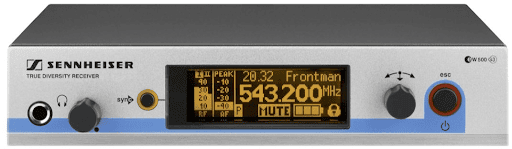
- Turn the mic off and on. The matching receiver screen should come alive when the mic is on. This also shows you which receiver belongs to which mic. If nothing changes, the mic is flat, or it isn’t paired with that receiver. Call us.
- Battery: most screens show a battery level, usually bottom right. Low means charge or change the batteries.
- MUTE on the screen: the mic itself is muted. Go back to step 2.
- Signal bar: one bar shows how strong the mic’s signal is. If it is low or empty while the mic is on, see “Sound drops in and out” below.
- Sound bar: another bar jumps when you speak. If it jumps when you talk, the mic is fine. The problem is further down the system (step 4).
- It jumps when you tap the mic, but not when you talk: the mic has probably been dropped and damaged. Use a spare mic and log a service request.
4. Is the system on, and is the volume up?
If the receiver shows sound coming in, the problem is further along.
- Control panel: check the system is on, the mic isn’t muted, the mic volume is up, and the right room is selected.
- Mixing desk: each mic has its own channel. Check that channel isn’t muted and its level and the main level are up. If the desk isn’t labelled, stop and call us.
- Still nothing? The amplifiers may be off, or something deeper in the system has a fault. Call us.
Sound drops in and out?
Usually a signal problem. Check how the mic is held first.
- Don’t hold the mic by the bottom. The aerial is in the base of most handheld mics. Holding it there can cut the signal by about half and cause dropouts. Hold it halfway up and the problem often disappears.
- Try fresh batteries, and stand closer to the receiver.
If it still drops out, it may need a clearer channel, better aerials, or a receiver setting adjusted. That’s a service job.
Squealing or howling (feedback)?
Feedback always means something is turned up too high. Try these on the spot:
- Move away from the speakers. Don’t walk in front of them with the mic.
- Turn the mic down on the control panel.
- Hold the mic halfway up, not around the ball. Mics are designed to ignore sound from behind. Cupping the ball blocks that and makes feedback much more likely.
We set school mics up so they shouldn’t squeal, even at full volume on the control panel. If yours squeals at normal volume, a setting inside the mic has probably been changed. Log a service request and we’ll reset it.
Are your wireless mics old?
Since 1 January 2015, it has been illegal in Australia to use wireless microphones in the 694 to 820 MHz band. That band was sold for 4G mobile. Older mics on those frequencies clash with mobile signals and work poorly. If your mics are about 10 years old or more, check the frequency on the label or receiver. If it’s in that band, you need new mics, not a repair. Ask us about an upgrade.
When to call us
Call us if:
- you’ve checked power, mute and volume and the mic still doesn’t work
- the receiver screen doesn’t come alive when the mic is turned on
- the sound keeps dropping out, or the mic squeals at normal volume
- the mic picks up taps but not voices
- your mics are old
If any check feels too technical, stop there and call us. That’s what we’re here for.
If your system is so complicated that staff struggle to use it, that isn’t a service fault. It’s a sign the system needs simplifying, and that’s something we specialise in.
Direct Service Phone: 03 9459 0000
Email: service@dibaustralia.com.au
Related: No sound from your school AV system · AV control panel not responding