


What’s Included in a Classroom Projection System? A School Guide
When schools plan a technology upgrade, the conversation often starts with the projector. In this article, we are specifically referring to projector-based classroom projection systems, not interactive flat panels or other display technologies.
A reliable classroom projection system is much more than a single device. A complete classroom AV system brings together display, audio, inputs, control, and infrastructure components that work as one to support teaching and everyday classroom use.
Understanding what is included in a classroom projection system helps Principals, IT Managers, and Business Managers invest in solutions that are practical, scalable, and built for long-term reliability.
The Visual Foundation: Projector and Screen
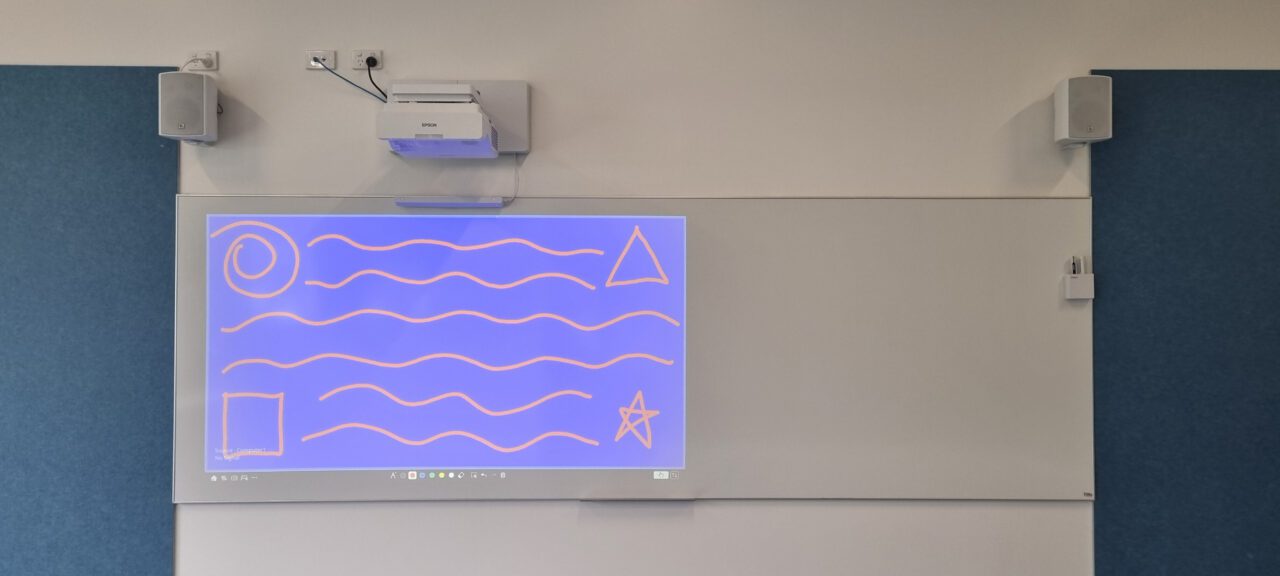
Every classroom AV setup starts with the display. This may include a standard, short-throw, or ultra-short-throw projector selected to suit room size, lighting, and teacher practice.

Safe Mounting and Physical Setup
How a system is installed is just as important as what is installed. Ceiling or wall mounts position the projector accurately, protect equipment, and support long-term use. Professional mounting also considers safety and service access.
Integrating Classroom Audio Components
Clear visuals mean little if students can’t hear. In projector-based classrooms, audio typically falls three key categories:
Vision audio is the most common and supports projected content with speakers and amplification for videos and presentations.
Hearing augmentation systems support students or staff with hearing impairment and connect to compliant hearing assistance technologies. These are standard in new school buildings but are less frequently added during existing classroom upgrades unless required for compliance.
Soundfield or teacher voice augmentation systems use teacher microphones and distributed speakers to evenly project the teacher’s voice, improving speech clarity and reducing vocal strain. These systems sometimes accompany hearing augmentation in new classrooms but serve a separate purpose.
Control, Connectivity, and Sources
A complete classroom AV system caters to multiple inputs, allowing teachers to connect laptops, document cameras, media players, or tablets. Connections are typically made via wall plates (HDMI, USB-C) or wireless systems, providing flexible, easy-to-use options for presenting content.
A central controller —either a wall-mounted control panel or a remote control—allows staff to switch sources, adjust volume, and operate the system efficiently. Wall panels offer more reliable access, while remotes provide flexibility but can occasionally be misplaced.
Interactive and Touch Technologies
Finger-touch units or interactive projector modules transform the projected image into a touch-enabled surface. These components integrate with classroom software, expanding how teachers and students interact with content.
While touch functionality via projectors can enhance learning, it generally requires more calibration and maintenance than touch-enabled LCD panels. Still, for many classrooms, projector-based touch solutions provide an effective and flexible option without the higher cost of full interactive LCD screen installations.
Cabling, Networking, and System Integration
Behind every smooth-running classroom is proper cabling, power, and network setup. These unseen elements keep the system stable, safe, and ready for future upgrades.
Pre-Installation Planning
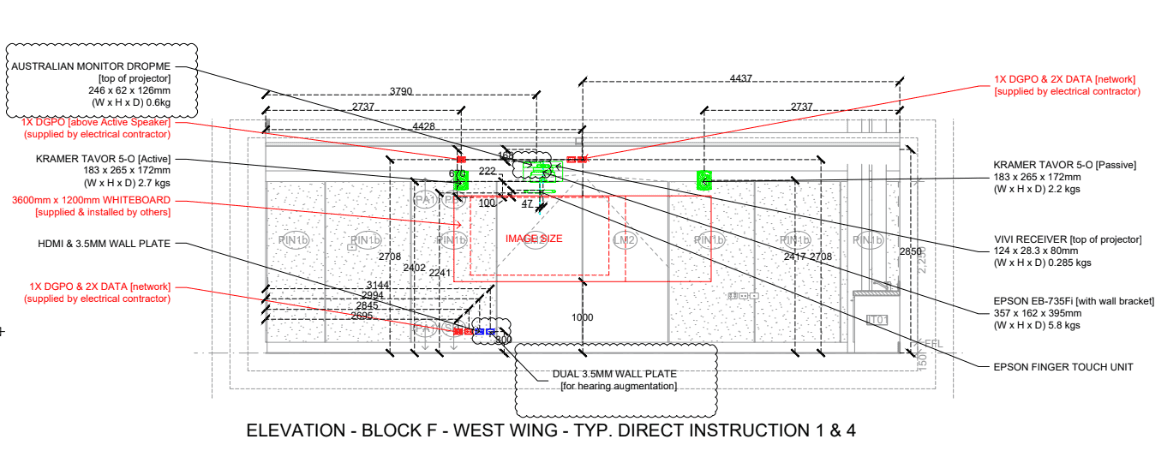
A classroom projection system is not a single product—it’s a coordinated solution. Careful pre-installation planning and structured processes—including elevations, drawings, and assessments of power, data, and optimal projector and whiteboard locations—ensure a neat, coordinated outcome.
This planning is especially important on construction sites or new builds, where detailed preparation guarantees a smooth installation and high-quality results. At D.I.B Audio Visual, this approach is standard practice, helping classrooms remain easy to use, easy to maintain, and ready to support modern teaching.
Planning a classroom AV installation?
Phone: (03) 9457 4800
Email: info@dibaustralia.com.au