

What Is the Jabra Scheduler? A Simple Way to Manage Meeting Rooms
Meeting rooms are shared spaces, but keeping track of which ones are available isn’t always straightforward. Staff may arrive at a room only to find it’s already in use, while other rooms sit empty because their availability isn’t immediately visible.
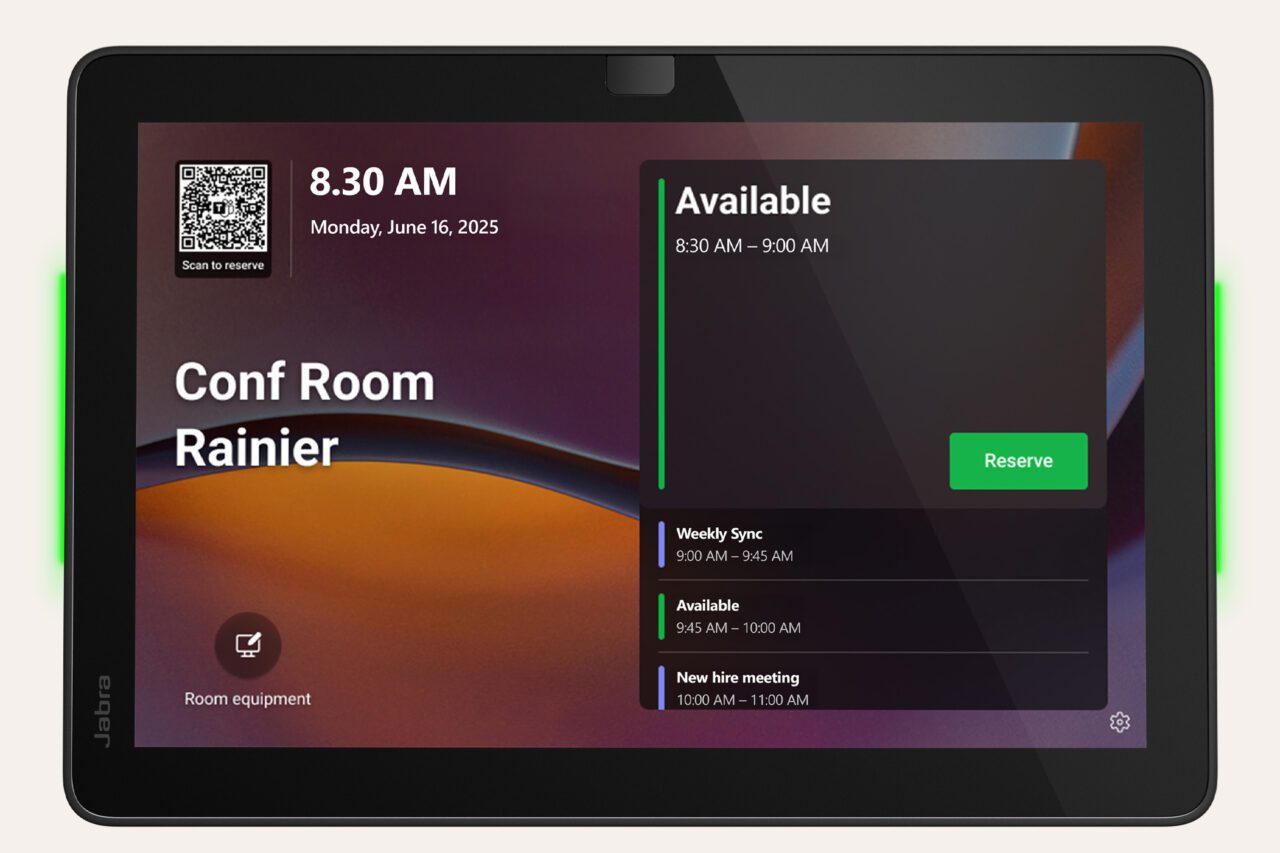
A room scheduling display helps make this process simpler by showing the status of a meeting room outside the door. One example is the Jabra Scheduler—a dedicated room scheduling panel designed for organisations using Microsoft Teams or Zoom. It displays whether a room is available, shows upcoming bookings and, depending on how the organisation has configured its room booking system, can also allow users to reserve an available room directly from the touchscreen.
For schools and workplaces, it offers a simple way to make meeting room availability easier to see without changing existing booking workflows.
What Is the Jabra Scheduler?
The Jabra Scheduler is a 10.1-inch touchscreen room scheduling panel that is installed outside meeting rooms. It connects with Microsoft Teams or Zoom room booking systems to display the room’s current status and upcoming reservations.
One of its most noticeable features is the integrated LED light bar. A green light indicates that the room is available, while a red light shows that it is currently booked. Because the light is visible from a distance, staff can quickly check room availability as they walk through a corridor, without needing to open a calendar or interrupt a meeting.
Key Features
Clear Room Availability
Rather than relying solely on calendars, the Jabra Scheduler displays room availability directly outside the meeting room. This makes it easier for staff to see whether a room is occupied before entering and quickly identify available spaces.
Microsoft Teams and Zoom Certified
The Jabra Scheduler is certified as both a Microsoft Teams Panel and a Zoom Rooms scheduling display, making it a suitable option for organisations already using these collaboration platforms. It works with existing room booking systems, allowing organisations to maintain familiar scheduling workflows.
Flexible Installation
Meeting rooms vary in design, so the Jabra Scheduler supports several installation options. It can be mounted on standard walls, glass walls or mullions, helping it suit a range of office and education environments.
The panel also supports Power over Ethernet (PoE), allowing power and network connectivity through a single cable, which can simplify installation where PoE infrastructure is available.
Centralised Device Management
For organisations managing multiple meeting rooms, the Jabra Scheduler can be managed through Jabra+, allowing IT teams to monitor device status and deploy updates from a central location.
Where Can the Jabra Scheduler Be Used?
Because it integrates with existing meeting room booking systems, the Jabra Scheduler is suitable for a wide range of shared spaces.
In schools, it can be used outside:
- Administration meeting rooms
- Leadership offices
- Conference rooms
- Staff collaboration spaces
- Professional learning rooms
In workplaces, it is well suited to:
- Boardrooms
- Huddle spaces
- Project rooms
- Training rooms
- Shared meeting rooms
Wherever meeting rooms are shared between multiple users, a scheduling panel can make room availability easier to see and help create a more consistent booking experience.
Is the Jabra Scheduler Right for Your Organisation?
If your school or workplace already uses Microsoft Teams or Zoom for room bookings, the Jabra Scheduler provides a simple way to display meeting room availability outside each space. Rather than replacing existing scheduling systems, it complements them by making booking information visible where people need it most.
For organisations looking to improve the meeting room experience, it offers a combination of clear room status indicators, flexible installation options and centralised device management in a dedicated scheduling display.
Planning a Meeting Room Upgrade?
Whether you’re fitting out a new building or upgrading existing meeting spaces, room scheduling panels can be a valuable addition to a modern AV system.
At D.I.B Audio Visual, we help schools and workplaces design and install integrated meeting room solutions, including displays, video conferencing systems, room control technology and scheduling panels. If you’re planning a meeting room project, our team can help you determine whether the Jabra Scheduler is the right fit for your environment.
To learn more about meeting room scheduling solutions, contact D.I.B Audio Visual on (03) 9457 4800 or email info@dibaustralia.com.au. Our team can discuss your requirements and recommend a solution that suits your space and existing meeting room technology.